Open source · MIT · .NET 10
Your agent knows XAF.
It has never seen your app.
One command changes that.
An agent that has read every page of the DevExpress documentation still does not know that
your Invoice total is calculated from its lines, that
ApproveController refuses to run when the period is closed, or that three
columns were hidden in the Model Editor and appear in no C# file at all.
It will confidently invent all three. That gap is not solvable by better prompting — it is solvable by reading the code.
The difference, in one line
Same code.
Two very different answers.
A real attribute from a real XAF entity. Ask an agent what it does with and without the extraction, and the gap stops being abstract.
[DefaultClassOptions]public class Order : XPCustomObject{ [Association("Customer-Orders")]
Without the extraction
“It filters the customer lookup. Customer probably has an active flag,
so I'll write IsActive = True.”
Confident. Fluent XAF. Wrong — that property does not exist.
With the extraction
“Filters the Customer lookup to unblocked customers.
IsBlocked is a bool on Customer, and this is
XAF criteria syntax — neither SQL nor a C# lambda — evaluated by the database.”
Read from your source: the property, its type, and the entity it belongs to.
[DataSourceCriteria("IsBlocked = False")] public Customer Customer { get; set; } [PersistentAlias("Lines.Sum(LineTotal)")] public decimal Total => /* calculated in the database */}
Where this fits
DevExpress teaches the framework.
This teaches your application.
These compose. Install the official skills for how XAF works, keep the documentation server for the official reference, and add this for the one thing neither of them can know.
Entities and relationships
Properties, types, associations, aggregation, and the XAF attributes that give them
meaning. XPO and EF Core, detected from your using statements.
Controllers and actions
Every action, its target criteria, and the C# that actually runs when someone presses the button.
Rules and the Model Editor
Validation with its messages, conditional appearance, calculated properties — and the
.xafml customizations that exist in no C# file.
What runs when you open a screen
The screens are in no file.
Neither is what loads onto them.
XAF generates a list, a detail and a lookup view for every business class, plus a list view
for every collection — and the Model Editor stores only the ones somebody changed. Grep your
source for Patient_Prescriptions_ListView and you find nothing. It is still a
screen your users open.
Which controllers run there is decided at run time, by four conditions XAF ANDs together: nesting, view type, object type and view id. Every one of them is unrestricted when unset, so a controller that sets none loads onto every screen you have — and almost nobody knows which of theirs do.
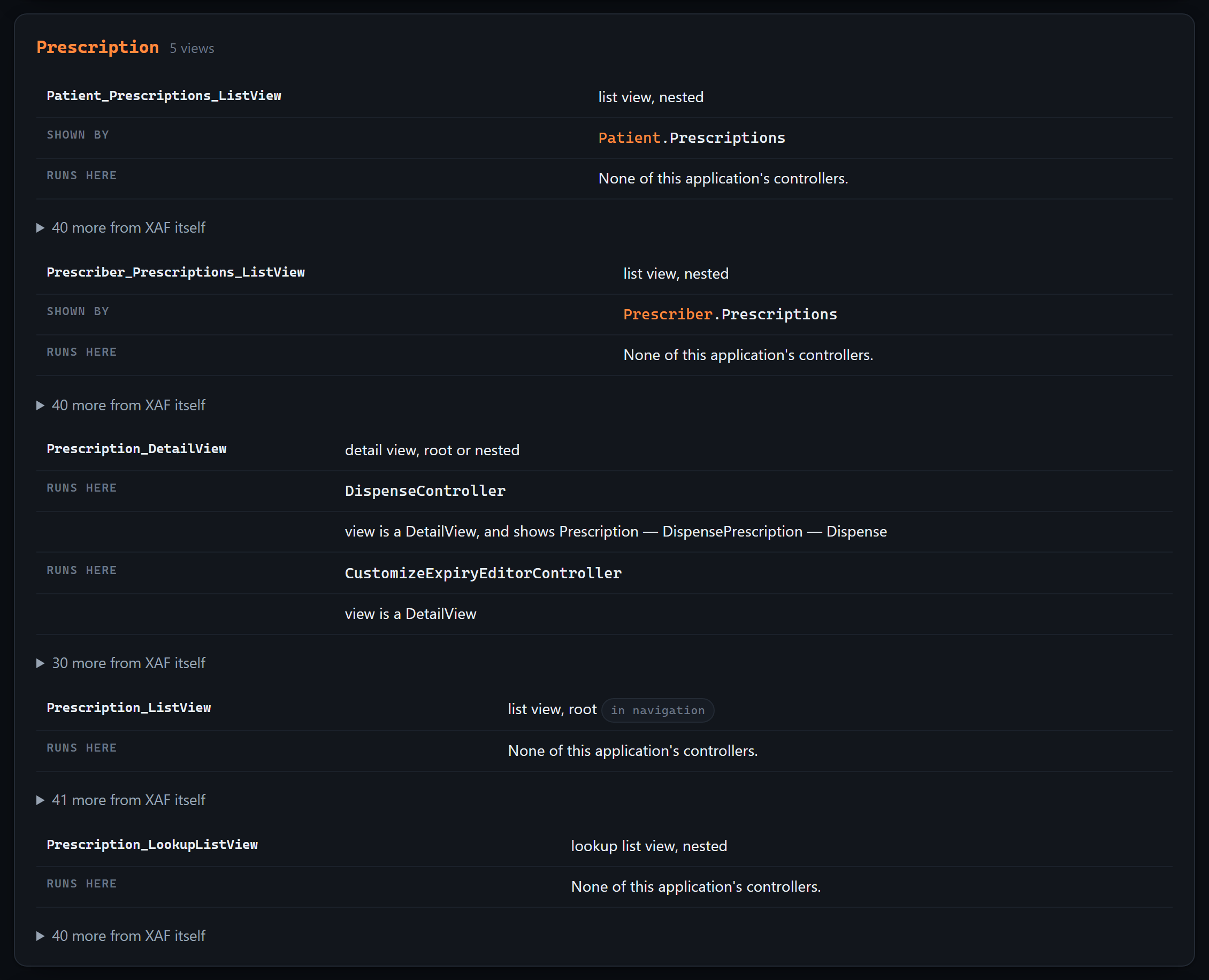
ViewController.IsFitToView, condition by condition, against
an inventory built from the framework's own id generators. Each match records why,
so the answer can be checked instead of trusted.
Two layers, kept apart
What your team wrote, in full. What XAF provides, folded behind one line — there is a great deal of it, and it is not yours to change. The distinction is the whole point when somebody asks you to change what a screen does.
What it refuses to claim
A controller listed here can still switch itself off through Active["reason"],
which depends on the data and the user. This is what XAF loads onto a screen —
and anything unreadable from source is listed apart, with the reason, rather than quietly
counted as “runs everywhere”.
The limit
Your reports are not in your repository.
Saying so is the feature.
Every other section on this page claims we found something you could not see. This one is the opposite, and it is the half that decides whether the rest is worth trusting.
Reports V2 lets your users design reports at run time. Those are stored as rows in your database, not as files — so no tool that reads a repository can see them, this one included. An application with forty reports and none in its source is not unusual. It is what a reporting setup looks like when people actually use it.
What is in the source
Each registered report: what it is over, the filter inside its layout, its calculated
fields, the expressions behind its labels, and the parameters dialog it opens with — down
to the GetCriteria() that turns the answers into a filter. From designer
code, from a .repx, or from the report's own constructor.
What the list is
Three different sentences, not one. No ReportsModuleV2 and the list is all
of them. Module registered and it is a lower bound. Module registered
with nothing in source and the true number is unknown, not zero — which
is the most common case of the three.
Layouts nothing registers
A shop that designs reports outside Visual Studio keeps the .repx exports in
a folder beside the module and imports them by hand. Real work that no line of code
mentions — listed as unregistered rather than skipped.
The same rule, elsewhere
If the DevExpress catalog on your machine describes 26.1 and your application declares 23.2, every framework answer says so, with both numbers. A controller can be introduced or retargeted between releases: close enough is not the same as certain.
That third sentence is where a confident tool does real damage. An agent told “this
application has no reports” will design as though none can exist — for an application
whose users built forty. So AGENTS.md says it outright:
This application registers ReportsModuleV2 and declares no report in source.
That is not the same as having none: users design reports at run time and they are stored in the database, out of reach of anything reading this repository.
The number is unknown, not zero — do not tell anyone this application has no reports.
A tool that never says “I cannot see that” is not more capable. It is less checkable.
The output
An AGENTS.md is read on every request.
So most of it isn't in there.
That file is prepended to every question an agent answers in your repository — its size is a tax paid forever. Seventy kilobytes of entity detail there would crowd out the thing the user actually asked.
So the output is tiered.
The most valuable part is the smallest. The index opens with ground rules — which ORM this application uses and which APIs therefore do not exist in it, that the inventories are complete so anything absent genuinely is, and that some behavior lives in XML rather than in code.
CLAUDE.md and .github/copilot-instructions.md are written too.
Anything you added by hand survives regeneration, and regenerating twice produces identical
bytes.
Live, not a snapshot
Or let the agent
ask questions directly.
A generated file is a snapshot. The MCP server is a connection: twelve tools your agent calls against the source while you are still changing it, so it cannot go stale.
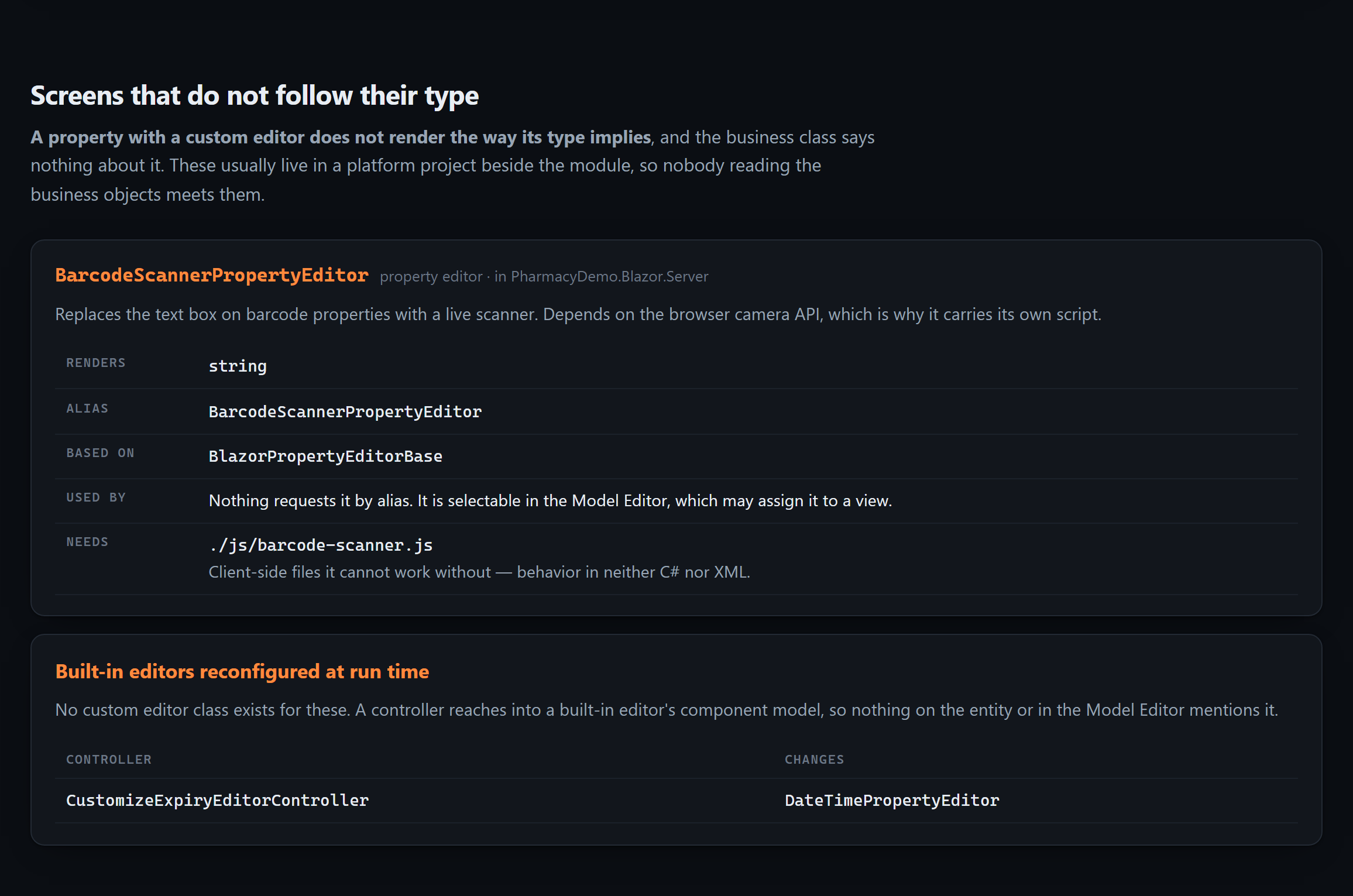
What this application is, and the complete list of everything in it.
Every property, relationship, rule and calculation on one entity.
What an action does — including the C# that runs when it fires.
How one business process works end to end: what runs, in what order, and what the walk could not follow.
What a report shows and the filter inside it — and whether the list is all of them or a lower bound.
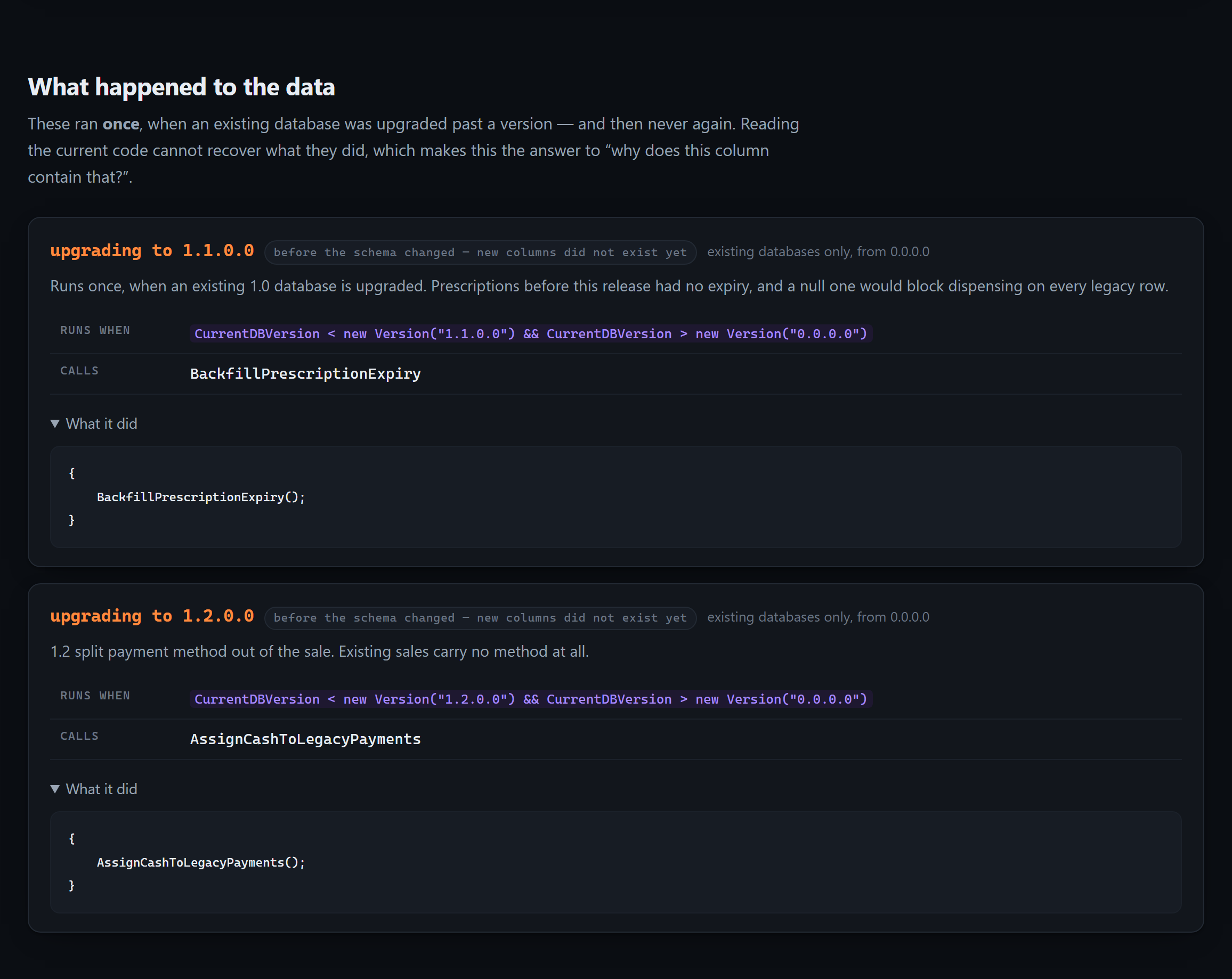
What loads onto one screen, the custom editors, what ran once against a live database, a business term, what the app enforces, the Model Editor, and a re-read of the source.
Ask for something that isn't there, and the answer is the useful one:
There is no entity called 'PurchaseOrder' in this application.
This is the complete list of 19 entities, extracted from the whole source tree: …
If the user expects 'PurchaseOrder' to exist, it has not been created yet.
A bare “not found” invites an agent to assume it looked in the wrong place and invent the type anyway. Extraction reads the whole tree, which is what makes the stronger claim true.
And for the person who inherits it
Most teams have never seen
their own domain model.
It exists as association attributes scattered across twenty files, and the map of it lives in one person's head — which is exactly the knowledge that leaves when they do.
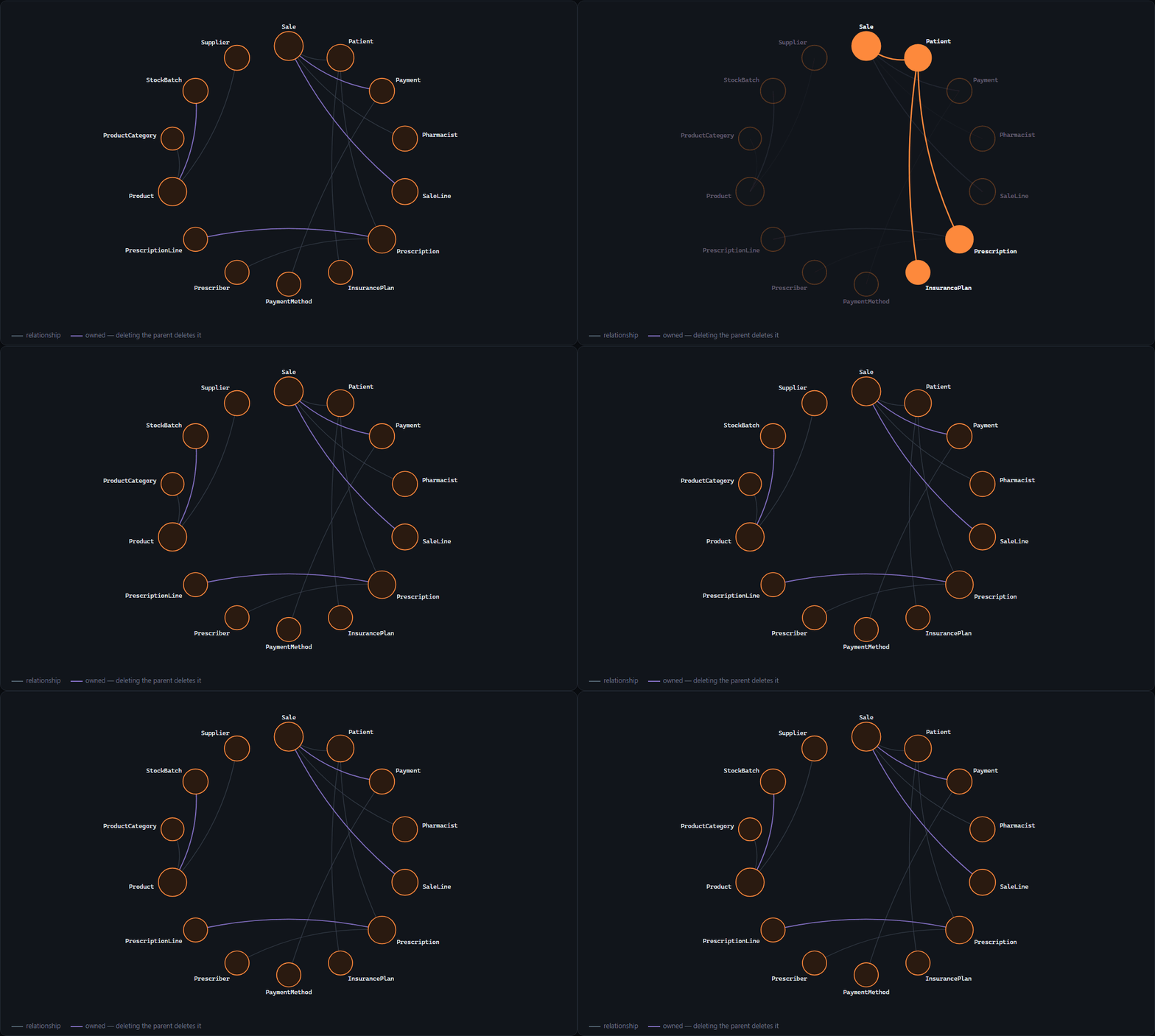
xaflogic explain writes one self-contained HTML file — no server, no build step,
no request to the network. It opens from an email attachment on a machine with no internet,
which is how handovers actually happen.
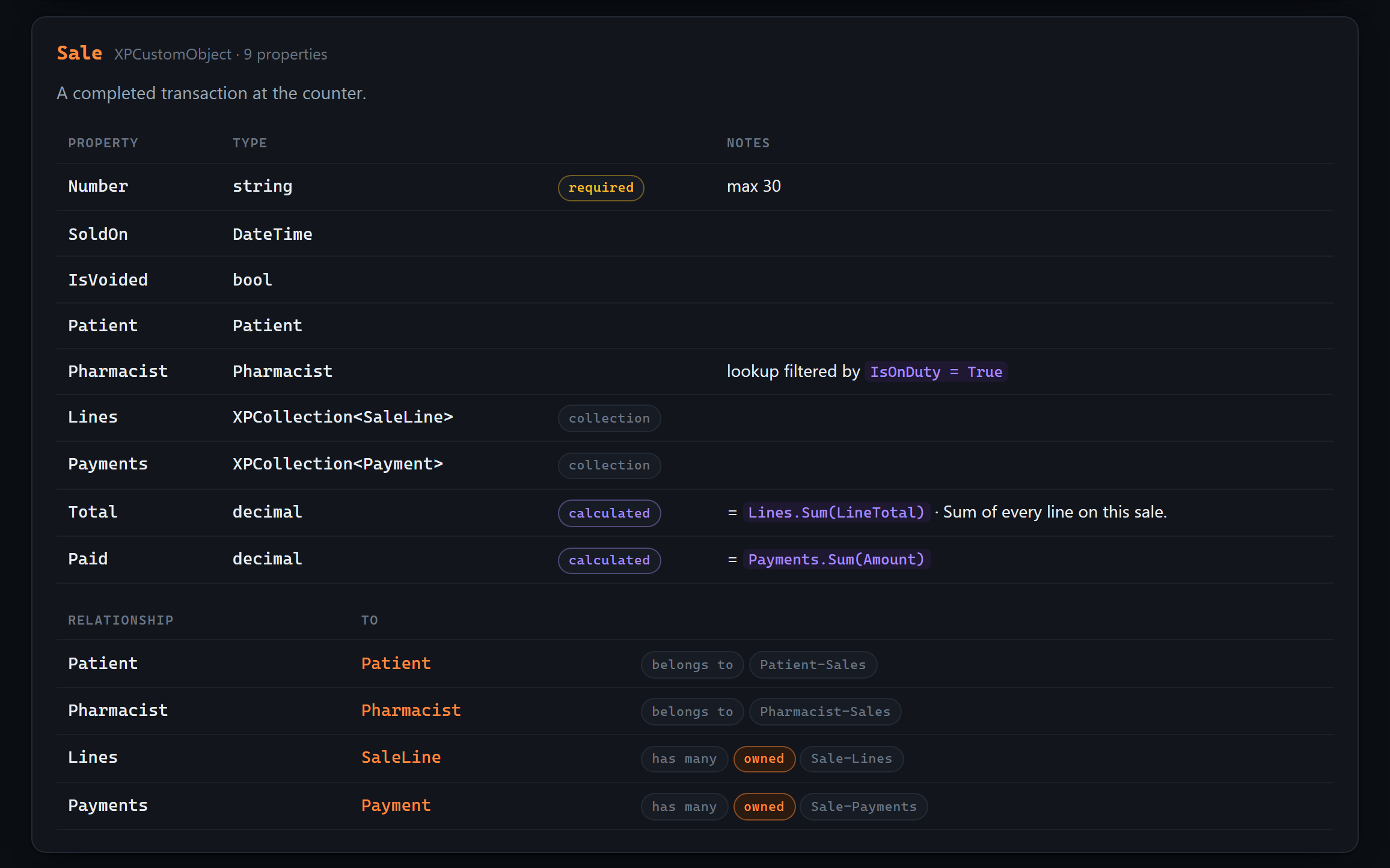
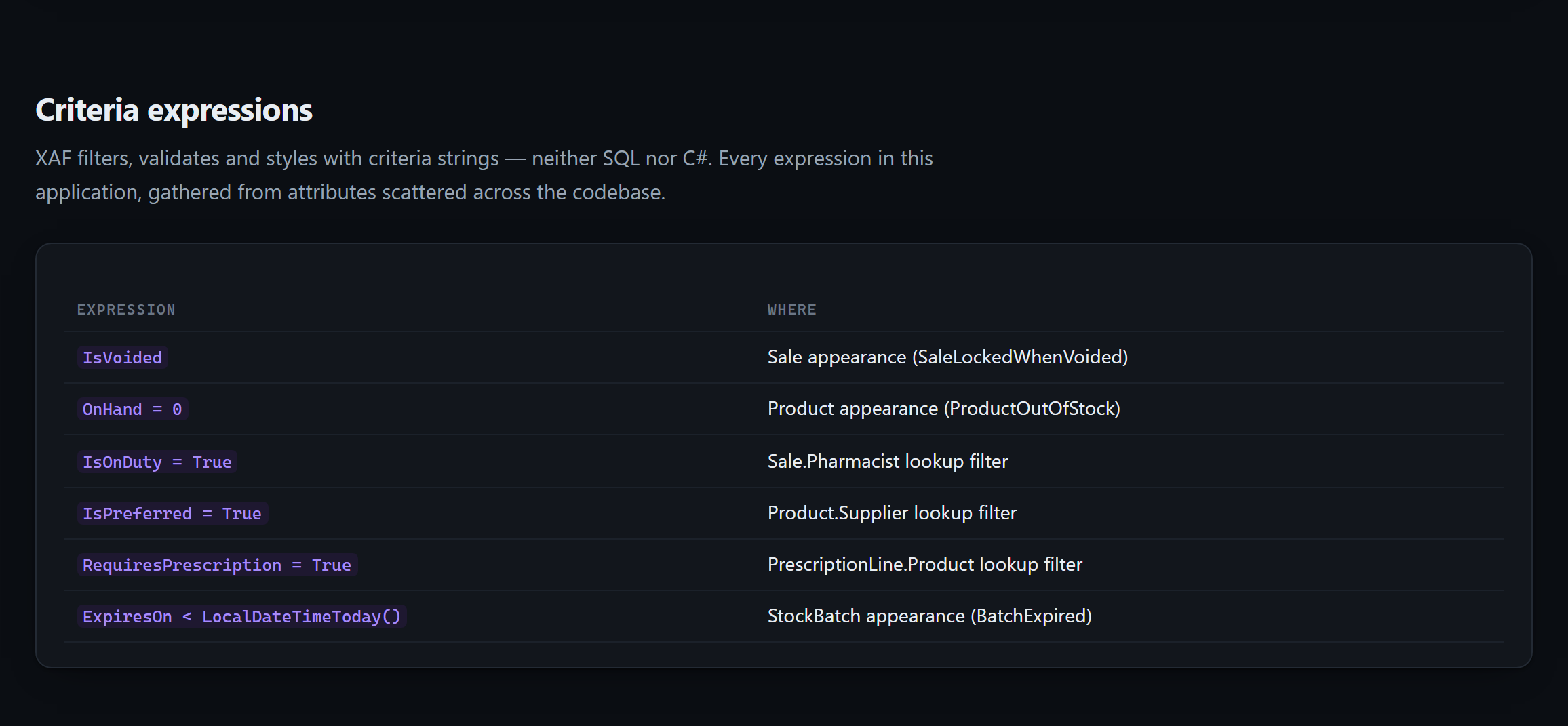
Alongside the map: every entity and what each property is, every action with the code it runs, validation with the message the user will actually see, and an index of every criteria expression in the application — a dialect that is neither SQL nor C# and is otherwise collected nowhere.
And for the person who has built forty of them
You already solved this.
In a project you cannot remember.
Ten years of XAF work for different clients, and somewhere in there is the class you are about to model again. Not a similar one — the same one, thought through properly, with the two properties you are going to forget this time.
xaflogic wiki reads every project you have configured into one page and
computes what they have in common. There is nowhere in that page to type a sentence about the
collection, which is the point: a hand-written summary of nine applications is wrong the day
the tenth arrives, and nobody notices.
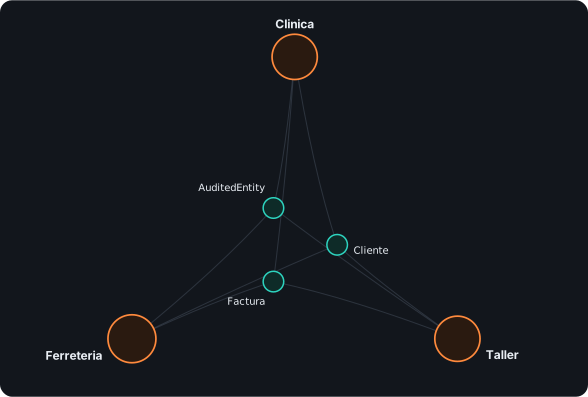
Classes you modelled more than once
Property by property, side by side, so you can see which application models
Cliente in the most detail before writing it a fourth time.
The layer you wrote yourself
Base classes carried from one application into another: your own framework, the one that was never written down.
The same name, two shapes
Total is a decimal in one application and a double
in another. Nothing is broken. It is how a total ends up two cents out.
Names you keep
The vocabulary of your applications, which nobody wrote down and everybody who joins has to learn by reading code.
What the wizard gave everybody
ApplicationUser is in every XAF solution made since 2021, because the
Project Wizard writes it. Two applications holding the same one did not build it twice,
so it is shown and left out of the count. Extend it in two of them and it comes back.
A name, and nothing else
An Identity ApplicationUser and an XAF one share a name and not one
property. The page says so, rather than leaving you to work it out row by row from a
comparison where everything differs.
Beside the map, two more pictures only a corpus can draw: which two of your projects are most alike, as a grid you click to hold the page to just those two, and the DevExpress releases your estate is spread across — with the one your framework catalog actually describes marked on it.
Two classes are matched by name. So the wiki tells you they share a name — the comparison beside it is what tells you whether they share an idea. It says which of those two things it knows, on the page, next to the finding.
Which is why the count is worth less than what it excludes. A class every XAF solution was given is not reuse; a pair that shares a name and no base, no contract and not one property was probably never the same idea. Both are still on the page, said out loud — one shared property name is enough to withdraw the second remark, because a concept rebuilt on another framework is still one concept.
Optional, for licensees
Tell your code apart
from DevExpress's.
Reading source alone leaves one question unanswerable: is
DeleteObjectsViewController something your team wrote, or something DevExpress
ships? xaflogic catalog build reads your own installation and answers it.
“This extends built-in behavior”
A controller deriving from DeleteObjectsViewController is changing how
deletion works application-wide, not adding a feature beside it.
“This attribute is yours”
An attribute in neither XAF nor .NET was invented by your team — its meaning lives in your codebase and in no documentation anywhere.
Install
Two minutes.
A .NET global tool. No account, no API key, no server.
$ dotnet tool install -g XafLogicExplainer.Cli # Write the context files at your solution root$ xaflogic agents --project "C:\MySolution\MyApp.Module" ✓ AGENTS.md✓ CLAUDE.md✓ .github\copilot-instructions.md+ 7 detail files in .xaflogic/ # Ask your agent something only this codebase could answer.
Prefer the agent to query live? Install the plugin:
/plugin marketplace add peopleworks/XAFLogicExplainer/plugin install xaf-logic-explainer@peopleworks-xaf # Pair it with the official DevExpress skills:/plugin marketplace add DevExpress/agent-skills/plugin install dx-xaf@DevExpress-agent-skills